The viewer has three side panels for detailed scene control. Open them from the panel buttons on the left side of the toolbar, or use keyboard shortcuts.
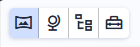
The four buttons are, from left to right: Full Viewer (closes the side panel), Scene Properties, Model Tree, and Interactive Tools. Clicking a panel button opens that panel. Click Full Viewer to close the side panel and return the full window to the 3D view.
- Probe data values, measure distances, and select objects. Open with Alt+T.
- Control the camera angle, zoom, vertical exaggeration, and take snapshots. Open with Alt+S.
- Show, hide, and edit individual objects in the scene. Open with Alt+M.