union
The union module is a powerful module that automatically performs a large number of complex serial and parallel subsetting operations required to compute and visualize the union of multiple analytes and threshold levels. The functionality of the union module can be obtained by creating a network fragment composed of only plume modules. However as the number of analytes in the union increases, the number of plume modules increases very dramatically. The table below lists the number of plume modules required for several cases:
| Number of Analytes | Number of plume Modules |
|---|---|
| 2 | 3 |
| 3 | 6 |
| 4 | 10 |
| 5 | 15 |
| 6 | 21 |
| 7 | 28 |
| n | (n * (n+1)) / 2 |
From the above table, it should be evident that as the number of analytes in the union increases, the computation time will increase dramatically. Even though union appears to be a single module, internally it grows more complex as the number of analytes increases.
The union of multiple analytes and threshold levels can be equated to the answer to the following question (example assumes three analytes A, B & C with respective subsetting levels of a, b and c):
“What is the volume within my model where A is above a, OR B is above b, OR C is above c?”
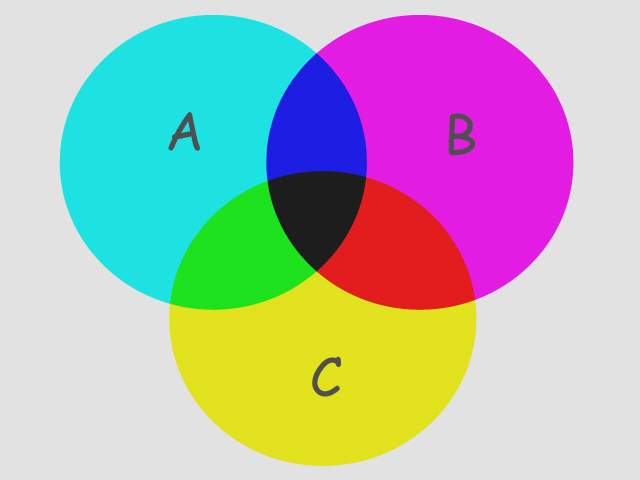
The figure above is a Boolean representation of 3 analyte plumes (A, B & C). The union of all three is the entire colored portion of the figure. Think of the image boundaries as the complete extents of your models (grid). The “A” plume is the circle colored cyan and includes the green, black and blue areas. The union of just A & C would be all colored regions EXCEPT the magenta portion of B.
Ports
| Direction | Name | Type | Description |
|---|---|---|---|
| Input | Input Field | Field | The main field for input. |
| Output | Output Field | Field | The subset field. |
| Output | Status | String | Text containing the union subset information. |
| Output | Output Object | Renderable | A renderable object displaying the selected data from the subset. |
Properties
| Property | Type | Description |
|---|---|---|
| Allow Run | Boolean | The Allow Run Toggle will prevent the module from running. This allows the user to make multiple changes without the module constantly updating. |
| Execute | Button | The Run Once button will cause the module to run one time even if the Allow Run toggle has been turned off. |
| Map Components | Multi-select | The Map Components value allows the user to select which data components to include in the output after the subsetting has completed. |
| Map Cell Components | Multi-select | The Map Cell Components value allows the user to select which cell data components to include in the output after the subsetting has completed. |
| Output String | Choice: First Subset, All Subsets, Last Subset | The Output String contains the name(s) and value(s) of the intersection subsets. |
| Above Output String | String | When the Include Region is set to Above, the Output String will use this string as its identifier. |
| Output String Delimiter | String | When the Output String consists of All Subsets, the Delimiter is the string occurring between each subset text. |
| Below Output String | String | When the Include Region is set to Below, the Output String will use this string as its identifier. |
Subsetting Values
| Property | Type | Description |
|---|---|---|
| Subset List | Subset Editor | The list of unions to create. |