intersection
The intersection module is a powerful module that incorporates some of the characteristics of plume, yet allows for any number of volumetric sequential (serial) subsetting operations.
The functionality of the intersection module can be obtained by creating a network of serial plume modules. The number of analytes in the intersection is equal to the number of plume modules that would be required.
The intersection of multiple analytes and threshold levels can be equated to the answer to the following question (the example assumes three analytes A, B and C with respective subsetting levels of a, b and c):
“What is the volume within my model where A is above a, AND B is above b, AND C is above c?”
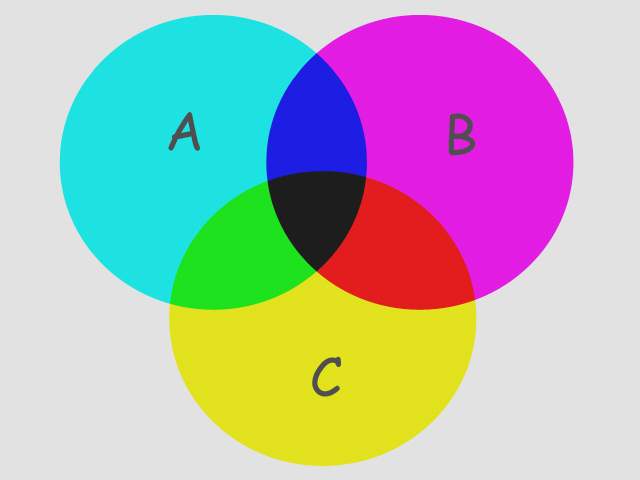
The figure above is a Boolean representation of three analyte plumes (A, B and C). The intersection of all three is the black center portion of the figure. Think of the image boundaries as the complete extents of your model (grid). The “A” plume is the circle colored cyan and includes the green, black and blue areas. The intersection of just A and C would be both the green and black portions.
For a non-volumetric shell visualization of the same subsets, use intersection shell. To compute the union (OR) of multiple subsets instead, use union.
Ports
| Direction | Name | Type | Description |
|---|---|---|---|
| Input | Input Field | Field | The main field for input. |
| Output | Output Field | Field | The subset field. |
| Output | Status | String | Text containing the intersection subset information. |
| Output | Output Object | Renderable | A renderable object displaying the selected data from the subset. |
Properties
| Property | Type | Description |
|---|---|---|
| Allow Run | Boolean | Prevents the module from running when turned off. This allows the user to make multiple changes without the module constantly updating. |
| Execute | Button | Causes the module to run one time even if Allow Run has been turned off. |
| Map Components | Multi-select | Selects which nodal data components to include in the output after the subsetting has completed. Options are the nodal data components of the input field, with an option to automatically select all of them. |
| Map Cell Components | Multi-select | Selects which cell data components to include in the output after the subsetting has completed. Options are the cell data components of the input field, with an option to automatically select all of them. |
| Output String | Choice: First Subset, All Subsets, Last Subset | Selects which subsets’ names and values are included in the Status output string. |
| Above Output String | String | The identifier used in the output string for subsets whose direction is set to above. |
| Output String Delimiter | String | When Output String is set to All Subsets, the string placed between the text of each subset. |
| Below Output String | String | The identifier used in the output string for subsets whose direction is set to below. |
Subsetting Values
| Property | Type | Description |
|---|---|---|
| Subset List | Subset Editor | The list of intersections to create. Each subset specifies a data component, a subsetting direction, a subsetting level (bounded by the component’s data range), and whether to include the constant surface. |