Deprecated
This module has been deprecated. Its functionality has been moved into the output object port in all modules.
texture colors
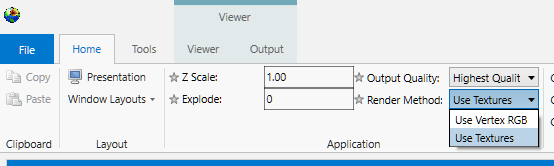
texture colors functionality has been incorporated into all modules. On the Home tab, you have the Render Method selector where you can choose to use Vertex RGB coloring or Textures.
Ports
| Direction | Name | Type | Description |
|---|---|---|---|
| Input | Input Field | Field | The field to texture. |
| Output | Output Object | Renderable | A renderable object to display. |
Properties
| Property | Type | Description |
|---|---|---|
| Texture Resolution | Integer | Texture Resolution determines the number of colors utilized in the texture map for coloring. Higher resolutions create smoother coloring, but at the expense of memory and compute/rendering time. |
External Faces
| Property | Type | Description |
|---|---|---|
| Split Edges | Boolean | Split surfaces when the edge between two neighboring cells is sharp. This improves rendering in most cases. |
| Split Edge Angle | Double | The Split Edge Angle is the maximum angle allowed between two adjacent faces before they are disconnected to create visually sharp edges. |
| Input Z Scale | Double | The Input Z Scale is the vertical exaggeration of the input object. |