illuminated lines

Deprecated

This module has been deprecated. Convert to using opacity by nodal data on tubes.

illuminated lines

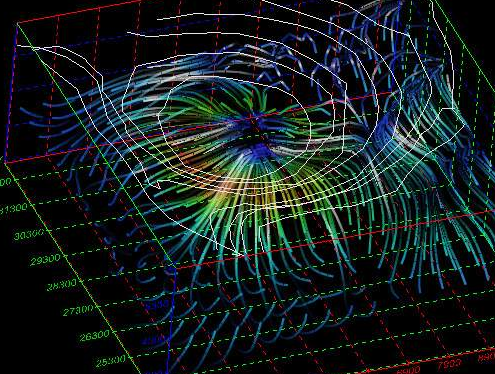
Display of illuminated lines using texture mapped illumination model on polylines with line halo and animation effects.

This module requires OpenGL rendering to be selected. This module utilizes special OpenGL calls to implement the illuminated line technique. If this module is used with another renderer, such as the software renderer or the output images module (not set to Automatic), lines will be drawn in the default mode with illuminated line features disabled.

This module requires the input mesh to contain one Polyline cell set. Any other type of cell set will be rejected, and any additional cell sets will be ignored. Any scalar node data may be present, or none for purely geometric display.
Ports

DirectionNameTypeDescription
InputInput FieldFieldA field containing lines to use for the animated output.
OutputOutputRenderableA renderable object displaying the animated lines.

Properties

PropertyTypeDescription
Data ComponentChoiceThe Data Component allows you to choose which data component of your incoming lines you wish to color by.
ProgressIntegerThe Progress slider allows you to control the current animation time in the Progress Loop. The time runs from 0 to the sum of the Animated Length and the Animation Spacing.
Animated LengthIntegerThe Animation Length sets the length of the effect along the polyline.
Animation SpacingIntegerThe Animation Spacing sets the spacing between effects along the line.
Progress LoopButtonThe Progress Loop controls setting the Animation Step by specified increments.
Interpolation ModeChoice: Ramped, SteppedIn Ramped mode, the interpolation can be selected to start small then get big, or the reverse or both. Stepped causes abrupt changes in effect.
Ramped Interpolation StyleChoice: Down, Up, Up and DownWhen Interpolation Mode is set to Ramped the Ramped Interpolation Style determines how values are blended.
Modulation TypeChoice: Opacity, WidthIf Opacity is selected the line segment varies in opacity from completely transparent to opaque. If Width is selected the line width is varied between 1 (very thin) to fat.
Reverse EffectsBooleanAs the animation effect is applied between two zones, such as the dash and the space between the dash, this toggle reverses the area where the effect is applied.
Halo WidthIntegerThe width control for the halo effect defines the size of the transparent mask region added to the edge of each line. A value of zero turns off the halo effect.

Shading Model

PropertyTypeDescription
Ambient LightingDoubleThis value provides a base shadow value, a constant added to all shading values.
Diffuse LightingDoublePure diffuse reflection term which amounts to shading dependent on light angle.
Specular HighlightsDoubleAmount of specular reflection hi-lights based on light and viewer angle.
Specular FocusDoubleTightness of specular reflection, low values are dull, wide reflections, high values are small spot reflections.
Line WidthIntegerControls line width. Normal 1-pixel lines are 1, can be increased in whole increments. Wide lines are drawn in 2D screen space, not full 3D ribbons. If you want full ribbons, use streamline module ribbon mode.
Line OpacityDoubleVariable opacity of all lines. A value of 1.0 is fully opaque, while a value of zero makes lines invisible.
Data Color BlendingDoubleIf node data is present, this controls the relative mix of data color and shading color. A value of zero sets full contribution of data color, while at 1.0 no data color is used and the line shade is dominated by illumination effects.
Smooth ShadingBooleanThis enables an additional interpolation mode for blended node data colors. In the off state, data is sampled once per line segment. When enabled, linear interpolation is used between end points of each segment.
Anti AliasBooleanThis effect, sometimes called ‘smooth lines’ blends the drawing of lines to create a smooth effect, reducing the effects of ‘jaggies’ at pixel resolution.
Sort OpacityBooleanThis mode assists visual quality when opacity or antialiasing modes are used, helping to reduce artifacts caused by non-depth sorted line crossings.