
There are two fundamentally different ways to accomplish this. You can use either:
- krig_2d or
- interp_data
Generally, if you are working with surface data such as X, Y, Z points in ASCII format, krig_2d is the easiest and best approach for a number of reasons. We recommend formatting your “surface” data in .APDV format since you only need 4 columns of numeric information in the file since we can omit the optional “Boring ID” and “Ground Surface Elevation” columns. Additionally, the third column of the file, which is normally the Z coordinate can be either the actual Z coordinate or it can just be ZERO (0.0). Therefore your Surface Input Data can be as simple as:
| Topo | Surface | @@Topo | |
| Elevation | m | ||
| 43 | 1 | m | |
| 630430.00 | 4272100.28 | 0.00 | 30.62 |
| 630451.85 | 4272071.13 | 0.00 | 30.80 |
| 630468.20 | 4272082.89 | 0.00 | 31.75 |
| 630474.35 | 4272081.63 | 0.00 | 31.83 |
| 630438.60 | 4272028.71 | 0.00 | 31.95 |
| 630486.45 | 4271972.71 | 0.00 | 30.95 |
| 630549.95 | 4271956.71 | 0.00 | 30.94 |
| 630511.30 | 4272192.16 | 0.00 | 30.23 |
| 630581.60 | 4272233.63 | 0.00 | 31.79 |
| 630586.35 | 4272223.80 | 0.00 | 30.46 |
| 630612.90 | 4271957.41 | 0.00 | 30.86 |
| ... (32 rows continue) | |||
 ](1.png)
However, this is not what we want to do!
We need to read the point data that needs new Z coordinates! If you already have these points in any C Tech data format (.APDV, .GEO, .GMF, .ELF), you're ready to go, but if not, the easiest format by far is .GMF. We would have used GMF format above except that krig\_2d won't read it. GMF requires only one header line (which only needs to be the word "surface") and then each line that follows needs to be 3 numbers, which are X, Y & Z coordinates. The three numbers can be separated by commas, spaces OR tabs. Since you don't know your Z coordinate, you can just enter ZERO (0.0) for Z, but don't leave it blank. If you already have other Z coordinates (non-zero) that is OK. It won't matter.
However, if you have a Boring or Sample ID that you want to (somehow) retain with each sample, one thing that will matter is sorting. I recommend that you sort your data by X or even X and then Y if you suspect that you'll have multiple points at the same X coordinates. Don't worry about the GMF format, it will allow you to add a fourth column of alphanumeric IDs (though my example below doesn't include them. Below are my points to receive new Z coordinates:
](1.png)
However, this is not what we want to do!
We need to read the point data that needs new Z coordinates! If you already have these points in any C Tech data format (.APDV, .GEO, .GMF, .ELF), you're ready to go, but if not, the easiest format by far is .GMF. We would have used GMF format above except that krig\_2d won't read it. GMF requires only one header line (which only needs to be the word "surface") and then each line that follows needs to be 3 numbers, which are X, Y & Z coordinates. The three numbers can be separated by commas, spaces OR tabs. Since you don't know your Z coordinate, you can just enter ZERO (0.0) for Z, but don't leave it blank. If you already have other Z coordinates (non-zero) that is OK. It won't matter.
However, if you have a Boring or Sample ID that you want to (somehow) retain with each sample, one thing that will matter is sorting. I recommend that you sort your data by X or even X and then Y if you suspect that you'll have multiple points at the same X coordinates. Don't worry about the GMF format, it will allow you to add a fourth column of alphanumeric IDs (though my example below doesn't include them. Below are my points to receive new Z coordinates:| surface | ||
| 630444.31 | 4272092.50 | 0.00 |
| 630471.31 | 4272110.50 | 0.00 |
| 630510.38 | 4272140.00 | 0.00 |
| 630563.50 | 4272085.00 | 0.00 |
| 630577.44 | 4272149.50 | 0.00 |
| 630581.19 | 4272104.50 | 0.00 |
| 630593.25 | 4272137.50 | 0.00 |
| 630601.69 | 4272064.50 | 0.00 |
| 630642.63 | 4272071.00 | 0.00 |
| 630686.38 | 4271967.00 | 0.00 |
| 630687.31 | 4272112.00 | 0.00 |
| 630705.94 | 4271999.50 | 0.00 |
| 630706.88 | 4272028.50 | 0.00 |
| 630717.13 | 4271962.00 | 0.00 |
| 630728.31 | 4272064.50 | 0.00 |
| 630729.25 | 4272126.00 | 0.00 |
| 630748.81 | 4272106.50 | 0.00 |
| 630749.75 | 4271964.00 | 0.00 |
| 630773.00 | 4271942.00 | 0.00 |
| 630786.06 | 4271937.00 | 0.00 |
 ](2.png)
Though you don't "have to", I recommend you turn OFF all of the Auxilliary Kriging Data, to keep the output in write\_coordinates as simple as possible.
[
](2.png)
Though you don't "have to", I recommend you turn OFF all of the Auxilliary Kriging Data, to keep the output in write\_coordinates as simple as possible.
[
 ](3.png)
The output of write\_coordinates when written as a .APDV file (recommended) is:
](3.png)
The output of write\_coordinates when written as a .APDV file (recommended) is:| X | Y | Z | @@"Topo" "Top" | |
| Elevation | ft | |||
| 20 | 2 | "linear_m" | "Linear_" | |
| 630444.31000 | 4272092.50000 | 0.00000 | 30.88729 | 0.00000 |
| 630471.31000 | 4272110.50000 | 0.00000 | 31.23166 | 0.00000 |
| 630510.38001 | 4272140.00000 | 0.00000 | 30.91186 | 0.00000 |
| 630563.50000 | 4272085.00000 | 0.00000 | 31.43954 | 0.00000 |
| 630577.44000 | 4272149.50000 | 0.00000 | 30.98077 | 0.00000 |
| 630581.19000 | 4272104.50000 | 0.00000 | 31.38604 | 0.00000 |
| 630593.25000 | 4272137.50000 | 0.00000 | 31.19432 | 0.00000 |
| 630601.69000 | 4272064.50000 | 0.00000 | 31.58800 | 0.00000 |
| 630642.63001 | 4272071.00000 | 0.00000 | 31.60125 | 0.00000 |
| 630686.38001 | 4271967.00000 | 0.00000 | 30.89467 | 0.00000 |
| 630687.31000 | 4272112.00000 | 0.00000 | 31.30851 | 0.00000 |
| 630705.94000 | 4271999.50000 | 0.00000 | 31.00343 | 0.00000 |
| 630706.88001 | 4272028.50000 | 0.00000 | 30.94432 | 0.00000 |
| 630717.13001 | 4271962.00000 | 0.00000 | 30.83236 | 0.00000 |
| 630728.31000 | 4272064.50000 | 0.00000 | 30.81563 | 0.00000 |
| 630729.25000 | 4272126.00000 | 0.00000 | 30.99120 | 0.00000 |
| 630748.81000 | 4272106.50000 | 0.00000 | 30.91623 | 0.00000 |
| 630749.75000 | 4271964.00000 | 0.00000 | 30.85721 | 0.00000 |
| 630773.00000 | 4271942.00000 | 0.00000 | 30.54853 | 0.00000 |
| 630786.06000 | 4271937.00000 | 0.00000 | 30.53783 | 0.00000 |
- X
- Y
- Z (it stayed zero, but we’ll ignore this)
- Topo (Z) as DATA (this is our REAL Z)
- Top Data (this was created by file_statistics when it read our GMF file. It is all zeros since the Z coordinates of our GMF file was all zeros.
If we delete the 3rd and 5th columns and change the 3 line header to be a one line header with just “surface”, we have a GMF file again with the correct Z coordinates
| surface | ||
| 630444.31000 | 4272092.50000 | 30.88729 |
| 630471.31000 | 4272110.50000 | 31.23166 |
| 630510.38001 | 4272140.00000 | 30.91186 |
| 630563.50000 | 4272085.00000 | 31.43954 |
| 630577.44000 | 4272149.50000 | 30.98077 |
| 630581.19000 | 4272104.50000 | 31.38604 |
| 630593.25000 | 4272137.50000 | 31.19432 |
| 630601.69000 | 4272064.50000 | 31.58800 |
| 630642.63001 | 4272071.00000 | 31.60125 |
| 630686.38001 | 4271967.00000 | 30.89467 |
| 630687.31000 | 4272112.00000 | 31.30851 |
| 630705.94000 | 4271999.50000 | 31.00343 |
| 630706.88001 | 4272028.50000 | 30.94432 |
| 630717.13001 | 4271962.00000 | 30.83236 |
| 630728.31000 | 4272064.50000 | 30.81563 |
| 630729.25000 | 4272126.00000 | 30.99120 |
| 630748.81000 | 4272106.50000 | 30.91623 |
| 630749.75000 | 4271964.00000 | 30.85721 |
| 630773.00000 | 4271942.00000 | 30.54853 |
| 630786.06000 | 4271937.00000 | 30.53783 |
- interp_data only works when the points to be interpolated fit INSIDE of the surface (or volume) that serves as the source of data.
- This means that if your points fall outside of the X-Y extents of your surface by one-millionth of a meter, you will not get any value assigned and the point will not pass through interp_data
- This also means that when using a surface as the data source, the points must be exactly ON the surface. The only way to ensure this is to put all points at Z=0.0 and to make the surface FLAT at Z=0.0.
- Therefore we must interpolate the surface elevation DATA, not the surface Z coordinates.
In this example, we’ll use all of the same data as above, and our application is shown below:
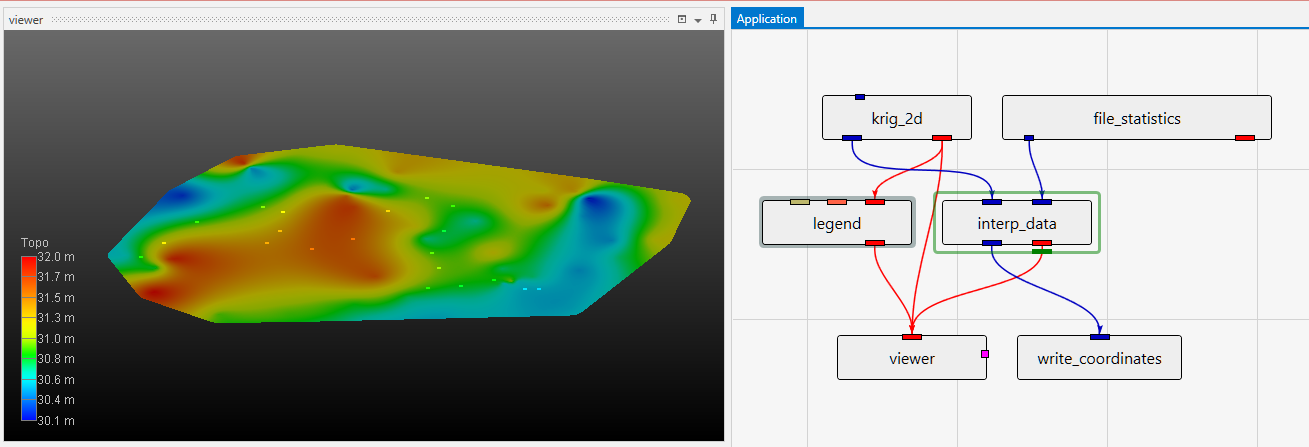 It is a bit easier to see how the points relate to the surface in this example, but we could have achieved this with a second krig_2d module in our earlier application. As discussed, all Z-Scales are set to 0.0 to make EVERYTHING FLAT. In this simple case, the results will be virtually identical as our earlier example, but our application is a bit more complex and if our data was a bit more spread out, we could have problems.